
This report is designed to display split loads. The report can be run by pickup or delivery point.
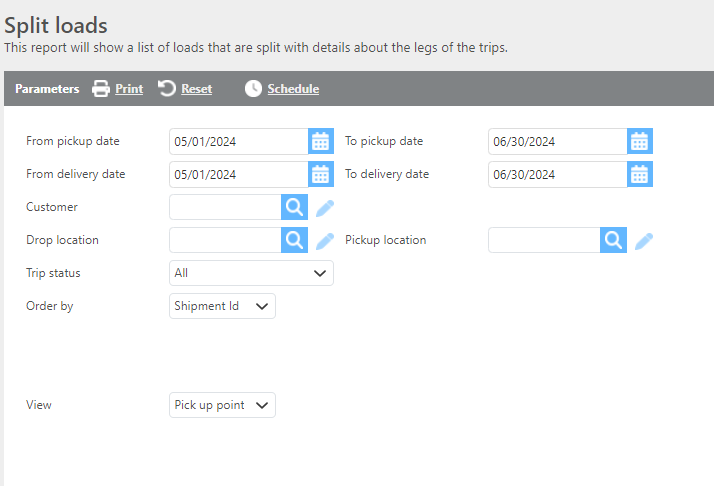
Report Parameters
|
Field |
Description |
|---|---|
|
From/To Pick up date |
Select a pickup date range. |
|
From/To Delivery date |
Select a delivery date range. |
|
Customer |
Use this filter to select a customer. Leave blank to run for all customers. |
|
Drop Location |
Use this filter to show splits that utilize the selected location. Leave blank to show splits at any drop point. |
|
Pickup Location |
Use this filter to show splits that utilize the selected location. Leave blank to show splits at any pickup point. |
|
Trip status |
Select the split status that should be included. |
|
Order by |
Select how this report should be ordered. |
|
View |
Select which view option to run this report by. Drop View will display the drop point Pickup view will display the pickup point. |
Tip: Run this report with the Trip Status filter set to Pending in the Pickup view to see all splits that need to be covered. Additionally, set a pickup location to find all loads needing to be covered from a certain hub.
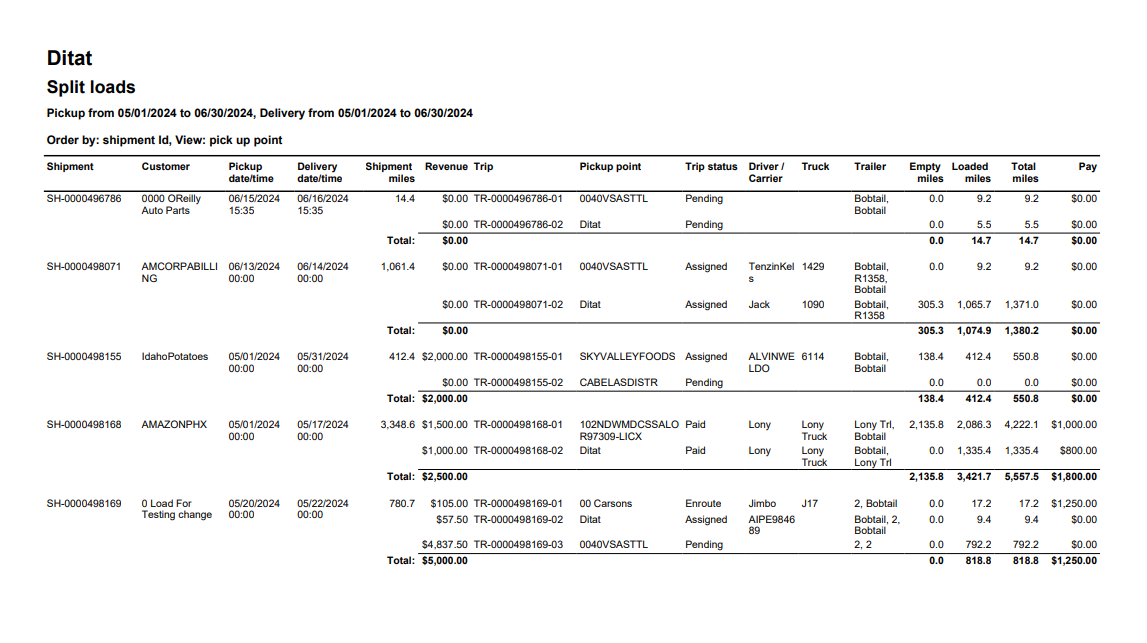
Report Columns
|
Field |
Description |
|---|---|
|
Shipment |
The shipment Id. |
|
Customer |
The customer Id. |
|
Pickup date/time |
The shipment pick up date/time. |
|
Delivery date/time |
The shipment delivery date/time. |
|
Shipment Miles |
The shipment miles. |
|
Revenue |
The revenue allocated to this leg of the split. |
|
Trip |
The trip Id. |
|
Pickup Point |
The pickup location. (Pickup View Only) |
|
Delivery Point |
The delivery location. (Delivery View Only) |
|
Trip Status |
The trip’s status. |
|
Driver/Carrier |
The Driver/Carrier assignment. |
|
Truck |
The Truck assignment. |
|
Trailer |
The Trailer assignment. |
|
Empty miles |
The trip empty miles. |
|
Loaded miles |
The trip loaded miles. |
|
Total miles |
The trip total miles. |
|
Pay |
The split trip’s pay. |