
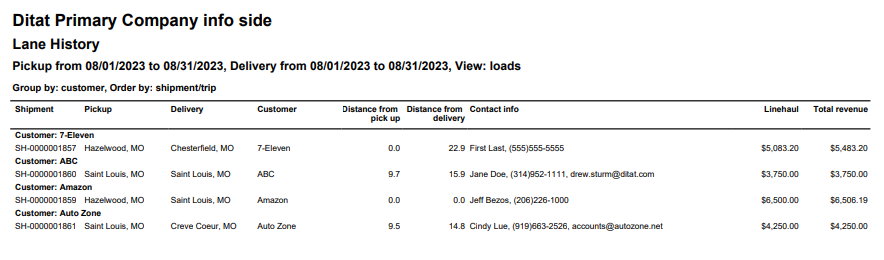
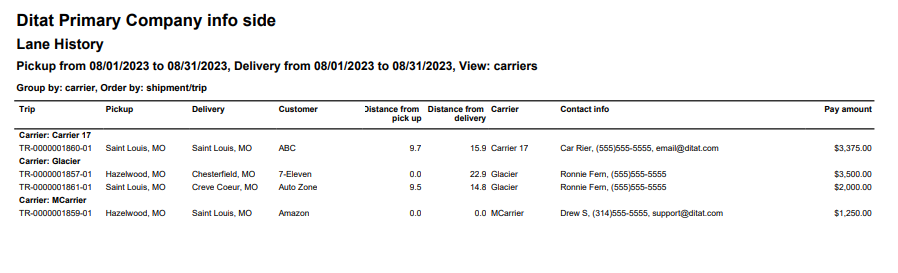
This report is designed to display past lanes used in two different view options. The Loads view will display lane history with customer and revenue information, while the Carrier view will display trip data with carrier and pay information. Use the geographical options to select an area, then the radius to dictate lanes that should display based on the distance from your selections.
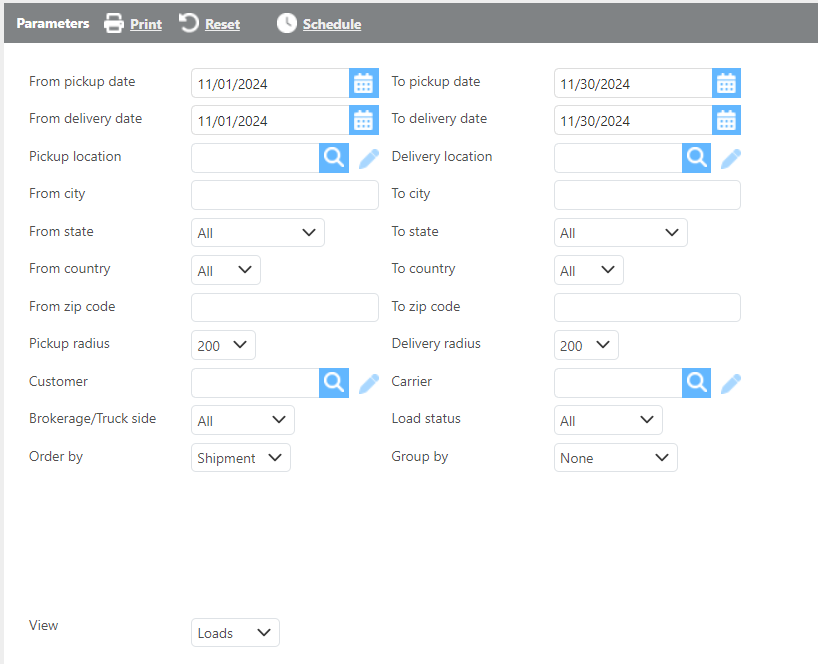
Report Parameters
|
Field |
Description |
|---|---|
|
From/To pickup dates |
Use this parameter to dictate loads to display by their pickup date. |
|
From/To delivery dates |
Use this parameter to dictate loads to display by their delivery date. |
|
Pickup location |
Select a location to be used with the Pickup radius filter. |
|
Delivery location |
Select a location to be used with the Delivery radius filter. |
|
From state |
Select a state to be used with the Pickup radius filter. |
|
To state |
Select a state to be used with the Delivery radius filter. |
|
From zip code |
Enter a zip code to be used with the Pickup radius filter. |
|
To zip code |
Enter a sip code to be used with the Delivery radius filter. |
|
Pickup/Delivery radius |
This drobox is used to select lanes that should display based off distance from Pickup/Deliver specifications. |
|
Customer |
Select a customer and only lanes for this customer will display. |
|
Carrier |
Select a carrier and only lanes for that carrier will display. |
|
Brokerage/Truck Side |
Select if brokerage, truck side, or both type of loads should display. |
|
Load Status |
Select a desired load status. |
|
Order by |
Specify how this report should order the lanes. |
|
Group by |
Specify how this report should be grouped. |
|
View |
Select the which view of this report to be viewed. |
Loads View
Carrier View
Report Results
|
Field |
Description |
|---|---|
|
Shipment/Trip |
The shipment or trip Id. |
|
Pickup |
The pickup city and state. |
|
Delivery |
The delivery city and state. |
|
Customer |
The customer assigned to the load. |
|
Distance from pick up |
The distance this load’s pick up is from the filter used on the report. |
|
Distance from delivery |
The distance this load’s delivery is from the filter used on the report. |
|
Carrier (Carrier view) |
The carrier assigned to the trip. |
|
Contact info |
The Customer or Carrier contact information depending on which view is selected. |
|
Linehaul (Loads view) |
The revenue from this load. |
|
Total revenue (Loads view) |
The load’s total revenue. |
|
Pay amount |
The carrier pay for the load. |