
The Early Late details report will allow you to see loads that are early or late. You can use the thresholds to ignore early or late loads for a specified time. This report will show the number of early or late shipments, as well as if they were early or late for the pickup or the delivery.
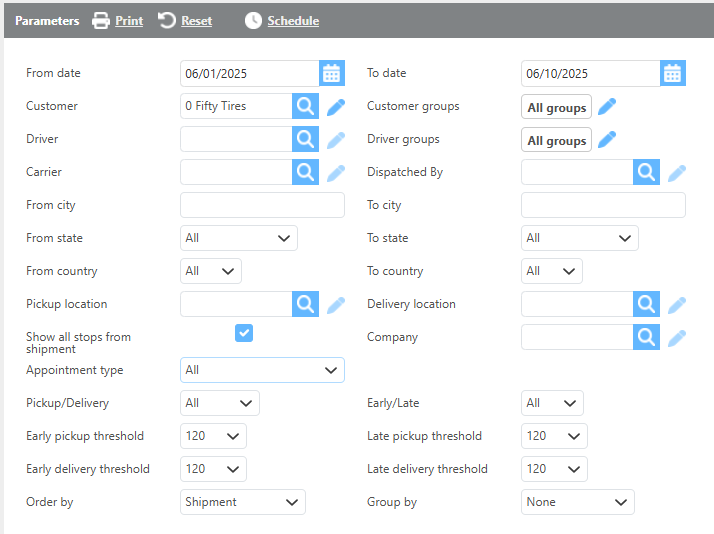
Report Parameters
Recommendation:
Use fewer filters to provide more data.
|
Field |
Description |
|
From/To Date |
Select the delivery date range for the shipments to view. |
|
Customer |
Select a customer to see only their shipments. |
|
Driver |
Select a driver to see only their loads. |
|
Carrier |
Select a carrier to see only their loads. |
|
Dispatched by |
Select a user and only loads dispatched by that user will display. |
|
Customer/Carrier/Driver Groups |
Choose a specific custom group to run this report by. |
|
From city |
Enter a city here to only view shipments picking up in that city. |
|
To city |
Enter a city here to only view shipments delivering in that city. |
|
From state |
Select a state here to only view shipments picking up in that state. |
|
To state |
Select a state here to only view shipments delivering in that state. |
|
From country |
Select a country here to only view shipments picking up in that country. |
|
To country |
Select a country here to only view shipments delivering in that country. |
|
Pickup location |
Select a location here to only view shipments picking up from that location. |
|
Delivery location |
Select a location here to only view shipments delivering at that location. |
|
Show all stops from the shipment |
Check this box if you want stops that are not early or late to show. |
|
Company |
Select one of your companies and only see their shipments. |
|
Appointment type |
This filter will adjust results based on appointment type. |
|
Pickup/Delivery |
Choose to show only pickups, deliveries, or all. |
|
Early/Late |
Choose to only show early, late, or all loads. |
|
Early/Late Thresholds |
Select a threshold. EX) 30 min, you would not see any loads less than 30 minutes early or late. |
|
Group by |
Select how the report should be grouped. |
|
Order by |
Select how the report should be ordered. |
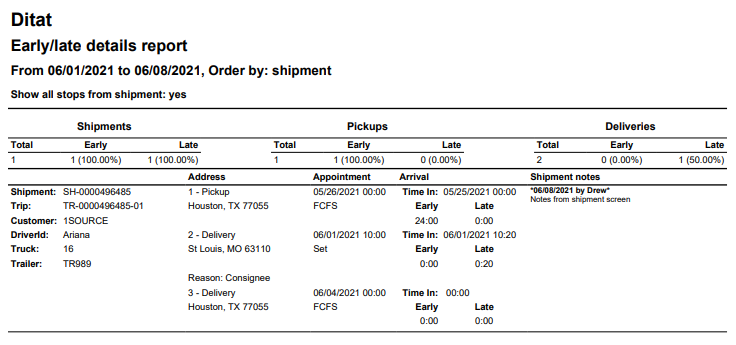
Report Columns
|
Field |
Description (Top Section) |
|
Shipments |
(Total) This will show the total shipment count for the date range. (Early) This will show the total early loads and its percentage of the total count. (Late) This will show the total late loads and its percentage of the total count. |
|
Pickups |
(Total) This will show the total pickups for the date range. (Early) This will show the number of early pickups for the date range and its percentage of the total pickups. (Late) This will show the number of late pickups and its percentage of the total pickups. |
|
Deliveries |
(Total) This will show the total deliveries for the date range. (Early) This will show the number of early deliveries for the date range and its percentage of the total deliveries. (Late) This will show the number of late deliveries and its percentage of the total deliveries. |
|
Field |
Description (Bottom Section) |
|
Shipment |
The unique shipment id. |
|
Trip |
The corresponding trip id. |
|
Customer |
The customer on the shipment. |
|
Driver Id |
The driver that was assigned to the trip. |
|
Truck |
The truck that was assigned to the trip. |
|
Trailer |
The trailer that was assigned to the trip. |
|
Address |
Displays the pickup and delivery address as well as the late reason from the check call. |
|
Appointment |
The set appointment times. |
|
Arrival |
The check call time and how early or late the driver arrived. |
|
Shipment notes |
Notes entered on the shipment. |