
This report will show the number of empty miles per trip with the truck, trailer, driver, and customer information. It will also show the unloaded origin and the delivery location.
This report will check Empty miles during the date range selected; it does not use delivery date.
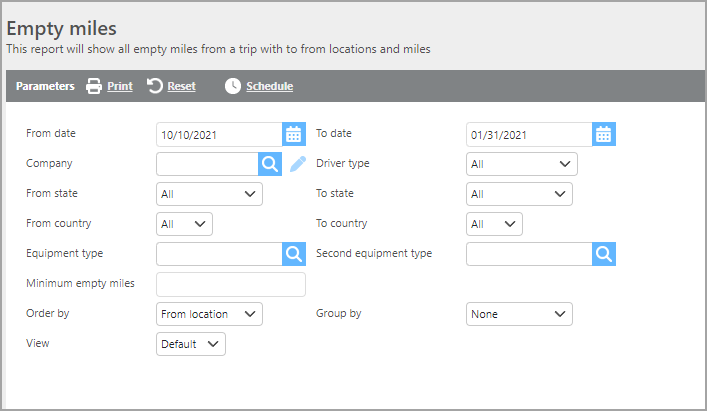
Report Parameters
|
Field |
Description |
|
From/To date |
Enter the date range. |
|
Company |
Select a company or leave empty. |
|
Driver Type |
Select a driver type. |
|
From state |
Choose a from state to see trips out of that state. |
|
To state |
Choose a to state to see trips delivering to that state. |
|
From country |
Choose a from country to see trips out of that country. |
|
To country |
Choose a to country to see trips delivering in that country. |
|
Equipment type |
Choose an equipment type to only see trips with that equipment type. |
|
Second equipment type |
Choose a secondary equipment type to only see trips with that equipment type. |
|
Minimum empty miles |
Specify a minimum number of empty miles. |
|
Order by |
Select how the report should be ordered. |
|
Group by |
Select how the report should be grouped. |
|
View |
Select either Default or View 2 to view the data. Default View shows pick up/delivery Location and City/State. View 2 shows pick up/delivery city/state only. |
Report Columns
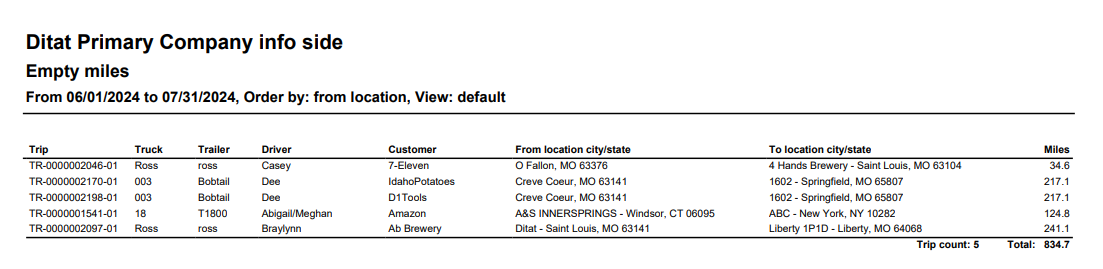
Default View
|
Field |
Description |
|
Trip |
The trip number. |
|
Truck |
The truck number that is assigned to the trip. |
|
Trailer |
The trailer number that is assigned to the trip |
|
Driver |
The driver that is assigned to the trip |
|
Customer |
The customer that the trip is for. |
|
From location city/state |
This field will display the unloaded origin's location id, city, state, and zip code. Default View will include Location and City/State. View 2 will only include City/State. |
|
To location city/state |
This field will display the delivery location id, city, state, and zip code. Default View will include Location and City/State. View 2 will only include City/State. |
|
Miles |
The empty miles for the trip. |
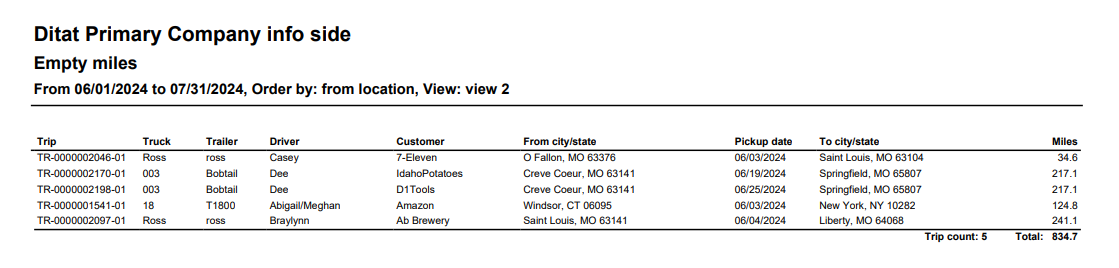
View 2
|
Field |
Description |
|---|---|
|
Trip |
The trip number. |
|
Truck |
The truck number that is assigned to the trip. |
|
Trailer |
The trailer number that is assigned to the trip |
|
Driver |
The driver that is assigned to the trip |
|
Customer |
The customer that the trip is for. |
|
From location city/state |
This field will display the unloaded origin's location id, city, state, and zip code. Default View will include Location and City/State. View 2 will only include City/State. |
|
Pickup date |
The pickup date of the trip. |
|
To location city/state |
This field will display the delivery location id, city, state, and zip code. Default View will include Location and City/State. View 2 will only include City/State. |
|
Miles |
The empty miles for the trip. |