
This report will show the number of shipments or trips created and the number of check calls and BOL's added for a date range.
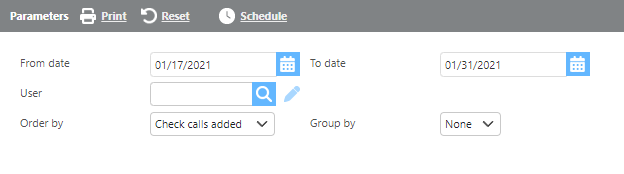
Report Parameters
|
Field |
Description |
|
From/To date |
Enter a date range to filter. This range checks the date an action was made. EX) Load is 4/20/26 - 4/22/26 and documents are added 4/23/2026. The dispatchers count for the document added will be included in the 4/23/26 date range. |
|
User |
Select the name or ID of the dispatch user. |
|
Order by |
Select from the drop-down to determine the report order. |
|
Group by |
Select from the drop-down to determine how the results are grouped. |
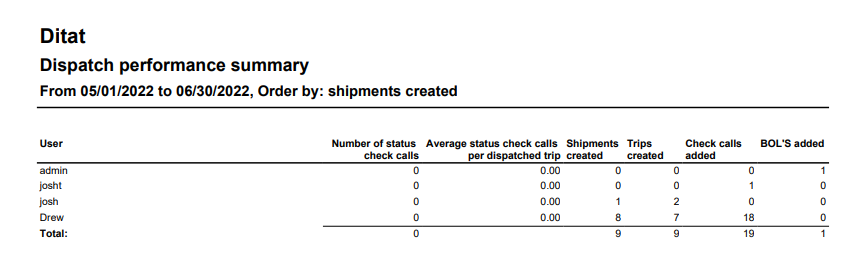
Report Columns
|
Field |
Description |
|
User |
The name or ID of the dispatch user. |
|
Number of status check calls |
The total number of status check calls added by the user during the selected range. |
|
Average status check calls per dispatched trip |
The average number of status check calls recorded per trip for this user. |
|
Shipments created |
The total number of shipments generated by the user. |
|
Trips created |
The total number of trips generated by the user. |
|
Check calls added |
The total count of all check calls recorded by the user. |
|
BOL's added |
The total number of BOL's uploaded or added by the user. |