
Navigation: Rate & Pay → Detention Plans
Click here for information on how to use a data entry window.
Detention plans automate the creation of detention charges that can be viewed on the Detention Board and added to shipments during the invoicing process.
Note: To add the Detention module to your account, contact sales@ditat.com.
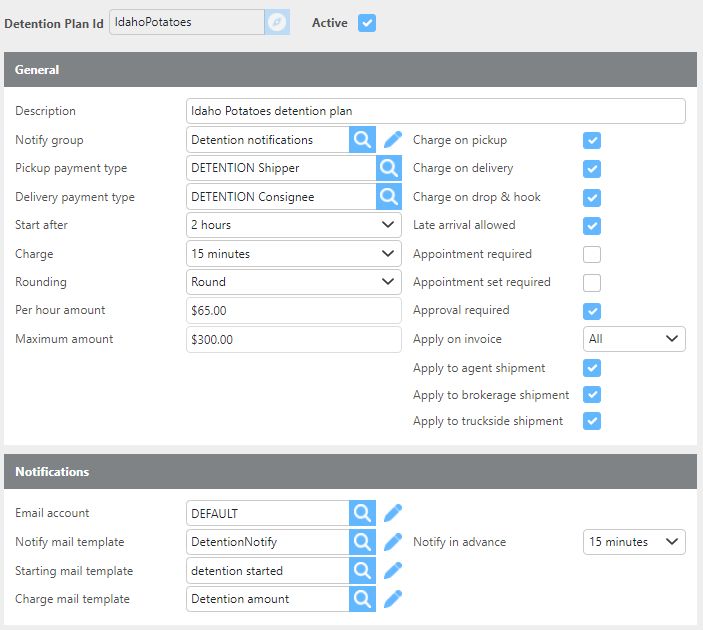
The plan shown above is an example of a detention plan that would charge $65 an hour for detention after 2 hours in 15-minute increments for pickup or delivery stops for any type of appointment or First Come First Serve stops.
Email Notifications
If an email template is entered in any of the notification fields, emails will be sent using the email account configured on the detention plan or the system default email account. To disable email notifications, leave all template fields blank.
Note: Detention notification emails will only be sent to contacts assigned the Detention type under the Additional Contacts section of the customer profile.
Detention Plan Fields
|
Field |
Description |
|
Detention plan Id |
Can be up to 25 characters and must be unique within the system. If you enter an ID that already exists, that detention plan will be loaded for editing. Otherwise, a new detention plan will be created. |
|
Active |
Check this box if this detention plan is currently in use. If unchecked, the system will not use this plan for calculating detentions. |
|
Notify group |
Select the user group that should receive detention notifications. |
|
Pickup payment type |
Select the payment type to use when adding detention charges for pickup stops. |
|
Delivery payment type |
Select the payment type to use when adding detention charges for delivery stops. |
|
Start after |
Select the time a driver must be at a stop before detention begins calculating. For example, if set to 2 hours, detention will start after the driver has been on site for more than 2 hours. |
|
Charge |
Select the increments in which detention is charged. |
|
Rounding |
Select the rounding method to use for this detention plan. |
|
Charge maximum |
Select the maximum detention amount that can be charged under this plan. |
|
Per hour amount |
Enter the hourly detention rate. |
|
Charge on pickup |
Check this box to apply detention charges at pickup stops. |
|
Charge on delivery |
Check this box to apply detention charges at delivery stops. |
|
Charge on drop & hook |
Check this box to apply detention charges at drop & hook stops. |
|
Late arrival allowed |
Check this box to allow detention to be charged when a driver arrives late at a stop. |
|
Appointment required |
Check this box to require an appointment at the stop in order to charge detention. |
|
Appointment set required |
Check this box to require that an appointment was scheduled in order to charge detention. |
|
Approval required |
Check this box to require a user to approve the detention before it can be added to an invoice. |
|
Email account |
Select the email account to use when sending detention notifications to customers. |
|
Notify mail template |
Select the email template to use for notifying customers of upcoming detentions. |
|
Notify in advance |
Select how far in advance to send the upcoming detention notification. This only applies if a template is selected in the Notify Mail Template field. |
|
Starting mail template |
Select the email template to use when notifying customers that detention has started calculating. |
|
Charge mail template |
Select the email template to use when notifying customers that a detention charge will be applied. |