
Navigation: Rate & Pay → Enter Detentions
Click here for information on how to use a data entry window.
Detentions created here can be viewed on the Detentions Board and added to shipments during the invoicing process. This process can also be automated using detention plans. Click here for more information on setting up detention plans.
Note: To add the Detention module to your account, contact sales@ditat.com.
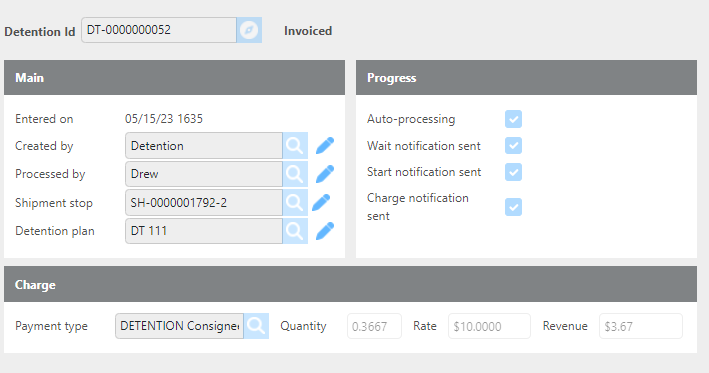
|
Field |
Description |
|
Detention Id |
The system-generated ID for this detention. |
|
Created by |
Automatically populated with the user who created the detention. |
|
Shipment stop |
Displays the shipment and stop this detention is associated with. |
|
Detention plan |
Displays the detention plan this detention was generated from, if auto-generated. Can also be selected manually. |
|
Auto-processing |
If checked, this is a system-generated detention that will progress automatically. If unchecked, this detention must be manually processed. |
|
Wait notification sent |
Checked automatically when the wait notification email has been sent. |
|
Start notification sent |
Checked automatically when the start notification email has been sent. |
|
Charge notification sent |
Checked automatically when the final charge notification email has been sent. |
|
Payment type |
Displays the payment type for this detention if auto-generated. Can also be selected manually. |
|
Quantity |
Displays the hours of detention being charged if auto-generated. Can also be entered manually. |
|
Rate |
Displays the rate for this detention. |
|
Amount |
Displays the total amount being charged if auto-generated. Can also be entered manually. |
Important: If you manually override any values in the charge section, uncheck the Auto-Processing box to prevent the system from reverting your changes.
Notes
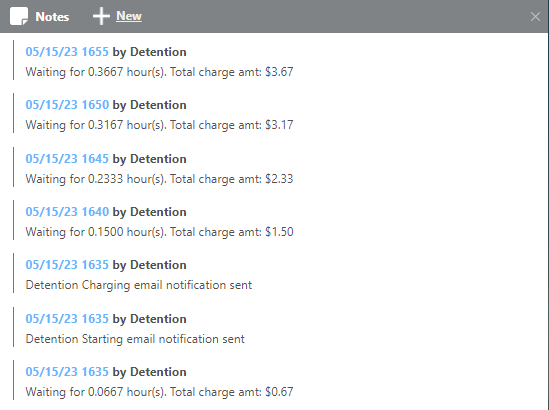
Use the Notes section to track and audit the detention process. The most recent note added will appear in the Notes column on the Detentions Board.