
Navigation: Rate & Pay → Fuel Optimization Profiles
Click here for information on how to use a data entry window.
Fuel Optimization analyzes the driver's current load and determines the best fueling locations based on current fuel levels, fuel prices, IFTA requirements, and your fuel discounts.
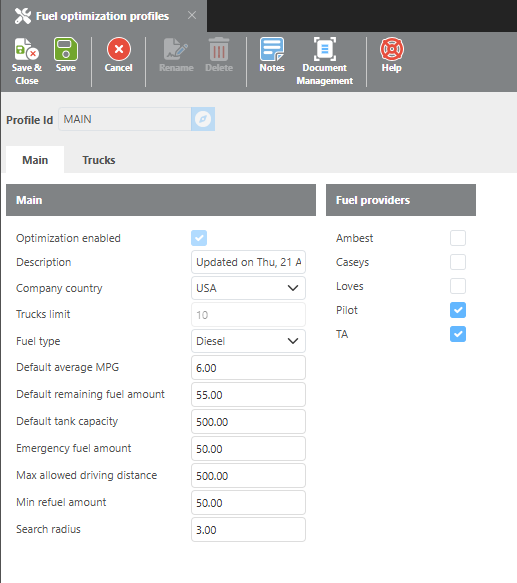
Main
|
Field |
Description |
|
Optimization enabled |
Check this box to enable fuel optimization for this profile. For more information and pricing, contact sales@ditat.com. |
|
Description |
Enter a description for this profile. |
|
Company country |
Select the country this company operates in. If USA is selected, IFTA will be factored into optimization calculations. |
|
Trucks limit |
Number of trucks to use this feature. To raise this, please contact sales@ditat.com. |
|
Fuel type |
Select the fuel type to use for optimization. Defaults to Diesel. |
|
Default average MPG |
Enter the average MPG to use for calculations. If an MPG value is entered on the truck's profile, that value will be used instead. |
|
Default remaining fuel amount |
Enter a default remaining fuel amount to use in calculations when no current fuel level is available from an ELD provider. |
|
Default tank capacity |
Enter the average tank capacity to use for calculations. If a tank capacity is entered on the truck's profile, that value will be used instead. |
|
Emergency fuel amount |
Enter the minimum fuel level at which the driver should refuel before it becomes critical. |
|
Max allowed driving distance |
Enter the maximum distance a driver should travel between fueling stops. |
|
Min refuel amount |
Enter the minimum amount of fuel that should be purchased at each fueling stop. |
|
Search radius |
Enter how far off route a driver should be willing to travel to reach a fuel location. |
|
Fuel Providers |
Select the fuel providers to include in optimization calculations. |
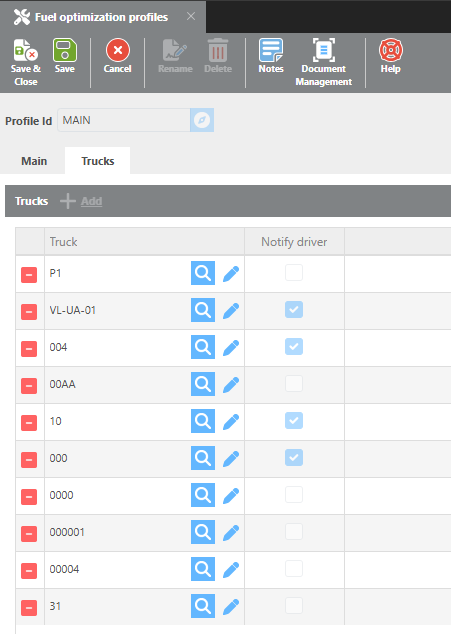
Trucks
|
Field |
Description |
|
Trucks |
Select the trucks to include in fuel optimization for this profile. |
|
Notify driver |
Check this box to send fuel optimization recommendations to the driver via the mobile dispatch app. This feature is currently disabled and will be available in a future update. |
Why is Fuel Optimization recommending fuel locations I don’t want my drivers to use, and how do I prevent this?
Some fuel networks include locations you may want to exclude. For example, within the Pilot network, you may not want drivers fueling at One9 locations. Currently, the system does not differentiate between location types within the same network.
In most cases, no manual exclusion is needed. Locations are automatically deprioritized when no fuel prices are uploaded for them — the system will only recommend a location if prices are on file. Simply upload your fuel prices for the locations you want to use and leave the others out.
If you are not uploading prices at all, you can effectively exclude specific locations by uploading a price list for those locations with an artificially high price (e.g., $25.00 per gallon). This will prevent them from being recommended under normal circumstances.
The system will only recommend an excluded location as a last resort if no other stations are available and the truck needs fuel.