
Navigation: Rate & Pay → Set Up Options → Auto Rate & Pay
Click here for information on how to use a setup window.
Goal
The goal of Auto Rate & Pay is to automatically calculate the rate for shipments that have a rate plan assigned, and to automatically calculate pay for trips where the driver or carrier has a pay plan assigned. Calculated rate and pay lines will be updated from the assigned plan on a 15-minute timer. Manually added rate and pay lines will not be affected by this process.
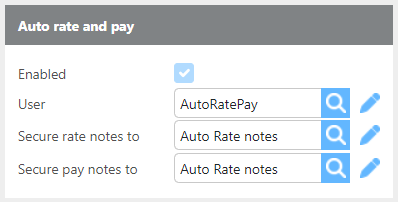
|
Field |
Description |
|
Enable |
Check this box to enable automatic rate and pay calculation every 15 minutes for all customers, drivers, and carriers with an assigned rate or pay plan. |
|
User |
Select the system user that will perform the auto rate and pay calculations. |
|
Secure rate notes to |
Select the user group that will be able to view auto rate calculation notes on shipments. |
|
Secure pay notes to |
Select the user group that will be able to view auto pay calculation notes on trips. |
How It Works
-
Auto-calculated rate and pay lines will be recalculated each time the process runs. If an auto-calculated line is manually edited, it will be overwritten the next time the process runs.
-
If you need to make a unique adjustment for a specific load, uncheck the Auto Rate box on the shipment and rate the load manually.
-
Any auto-calculated lines will be removed the next time the process runs if the Auto Rate box is unchecked.
-
Manually added charges or payments will never be affected — only lines generated by the assigned plan are updated.
Tip: Auto Rate can be disabled for a specific shipment by unchecking the Auto Rate box on that shipment. Auto Pay can be disabled for a specific trip by unchecking the Auto Pay box on that trip.
Auto Rate & Pay Notes
Auto Rate and Auto Pay processes will add notes to the shipment and trip records respectively when calculations are run. These notes are secured to the user groups configured in the setup above.
Specific shipments can have this feature turned off by unchecking the "Auto rate" box.

Specific trips can have this feature turned off by unchecking the "Auto pay" box.

Auto Rate notes will read:
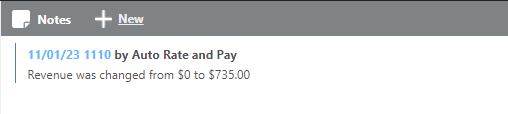
Auto Pay notes will read:
