
Account Settings
|
Field |
Description |
|
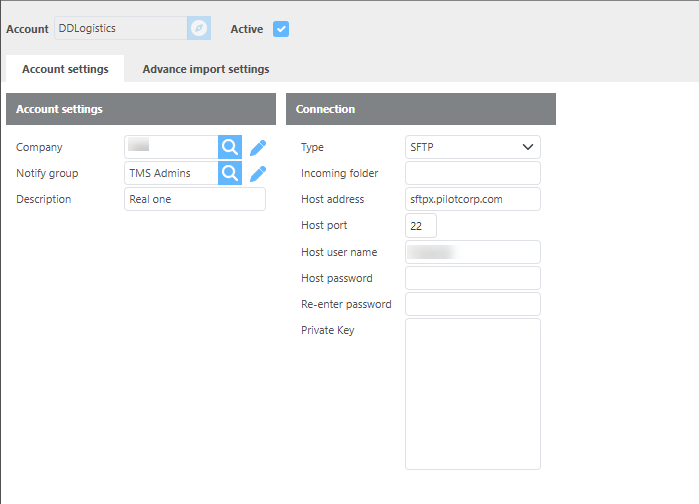
Company |
Select which Ditat company these advances will be linked to. |
|
Notify group |
Select the group that should receive PilotJ notifications. |
|
Description |
Enter a description for this account. |
|
Type |
Select FTP or SFTP for this connection. |
|
Incoming folder |
Enter the file path used to retrieve files. |
|
Host address |
Enter the host address. Default: |
|
Host Port |
Enter the port to use. Default port for FTP is |
|
Host username |
Enter the username provided by PilotJ. |
|
Host password |
Enter the password provided by PilotJ. |
|
Re-enter password |
Re-enter the password to confirm. |
Advance Import Settings
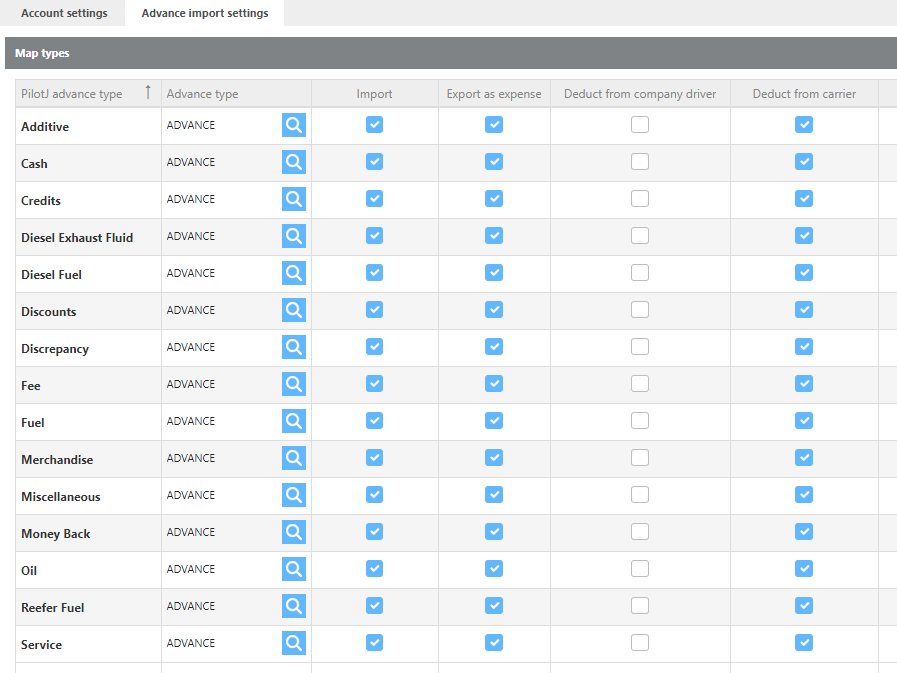
Note: The Unit ID in Ditat must match the Vehicle on the imported advance for the truck to be linked automatically.
|
Field |
Description |
|
PilotJ advance type |
A predefined list of advance types that PilotJ may send over for your account. These types are set by PilotJ and cannot be modified. |
|
Advance Type |
Select the Ditat advance type to link to this PilotJ advance type. |
|
Import |
Check this box to import this advance type when advances are imported. |
|
Export as expense |
Check this box to export this advance type to your accounting software when the batch is posted. |
|
Deduct from company driver |
Check this box to mark this advance type for deduction from a company driver by default. |
|
Deduct from carrier |
Check this box to mark this advance type for deduction from a leased driver by default. |