
Note: SFTP settings will be generated by your Relay account representative. Please email Support@ditat.com for setup assistance.
Integrate with Relay
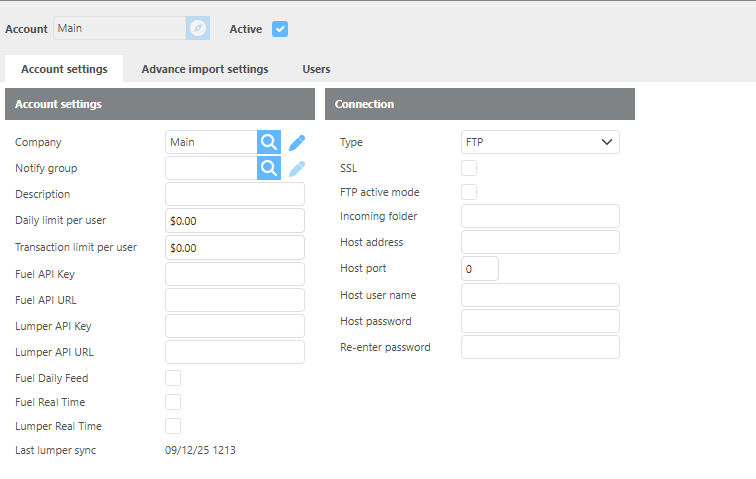
Relay Account settings
|
Field |
Description |
|
Company |
Select which Ditat company these advances will be linked to. |
|
Notify group |
Select the user group that should receive notifications on this setup. |
|
Daily limit per user |
Enter the default daily advance limit per user. |
|
Transaction limit per user |
Enter the default transaction advance limit per user. |
|
Fuel API Key |
Enter the Fuel API key provided by Relay. |
|
Fuel API URL |
Enter the Fuel API URL. Default: |
|
Lumper API Key |
Enter the Lumper API key provided by Relay. |
|
Lumper API URL |
Enter the Lumper API URL. Default: |
|
Fuel Daily Feed |
Check this box to pull fuel files on a daily basis. |
|
Fuel Real Time |
Check this box to use real-time fuel advances. |
|
Lumper Real Time |
Check this box to use real-time lumper advances. |
|
Last lumper sync |
Displays the date and time of the last lumper sync. |
Relay Connection settings
|
Field |
Description |
|
Type |
Select FTP or SFTP for this connection. SFTP is the default for Relay. |
|
Incoming folder |
Enter the incoming folder path to search for daily fuel files. |
|
Host address |
Enter the host address. Default: |
|
Host port |
Enter the port to use. Default: |
|
Host user name |
Enter the host username for this connection. This will be provided by Relay. |
|
Host password |
Enter the password for this connection. This will be provided by Relay. |
|
Re-enter password |
Re-enter the password to confirm. |
|
Private Key |
Enter the private key if applicable. This is not normally used for this integration. |
Advance Import Settings
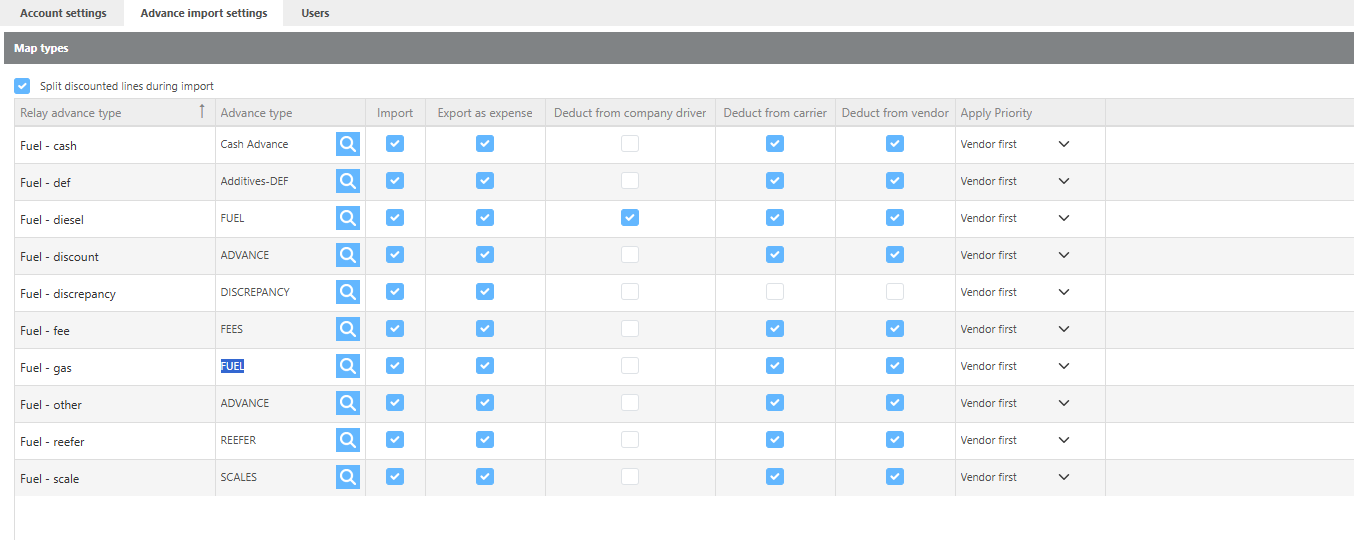
Select which Ditat company these advances will be linked to.
|
Field |
Description |
|
Split discounted lines during import |
If checked, fuel and discount amounts will be imported as separate lines on the advance so they can be mapped independently. |
|
Relay Advance type |
A predefined list of advance types that Relay may send over for your account. These types are set by Relay and cannot be modified. |
|
Advance type |
Select the Ditat advance type to link to this Relay advance type. |
|
Import |
Check this box to import this advance type when advances are imported. |
|
Export as expense |
Check this box to export this advance type to your accounting software when the batch is posted. |
|
Deduct from company driver |
Check this box to mark this advance type for deduction from a company driver by default. |
|
Deduct from carrier |
Check this box to mark this advance type for deduction from a leased driver by default. |
|
Deduct from vendor |
Check this box to mark this advance type for deduction from a vendor by default. |
|
Apply Priority |
Use this field to specify which party should be deducted from first if both a vendor and a carrier are listed on the advance. |
Example: If a leased driver and a vendor are both linked to an advance, the Apply Priority setting determines which party the advance is deducted from.
User Limits
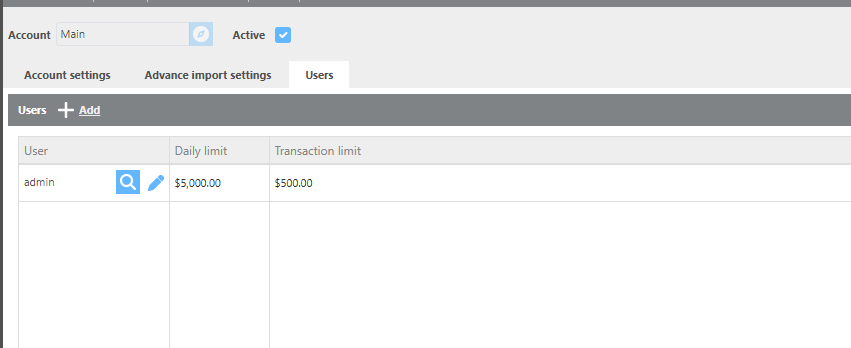
|
Field |
Description |
|
User |
Select the Ditat user to assign specific limits to, if different from the account defaults. |
|
Daily limit |
Enter the maximum amount this user can issue in advances in a single day. |
|
Transaction limit |
Enter the maximum amount this user can issue in a single transaction. |
Driver Linking
Advances will automatically link to a Ditat driver if the Relay Driver Integration ID is assigned to the driver's Ditat profile, or if the Driver ID matches the driver's name on the advance.