Ditat's RTS integration automatically sends invoices to RTS Factoring via FTP when an invoice batch is posted.
RTS Integration Notes
-
Each invoice is sent as a separate PDF.
-
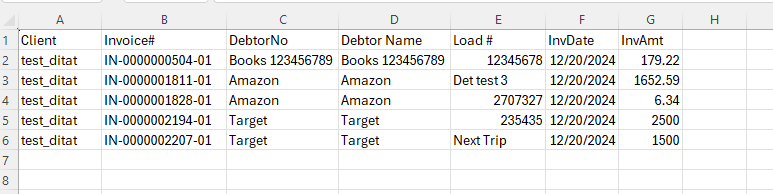
A CSV file is also sent showing all invoices in the batch.
-
Secondary invoices will not be sent to RTS Factoring and must be manually uploaded.
Important: Customers billed by RTS must use the RTS-specific invoice template (Invoice RTS Financial).
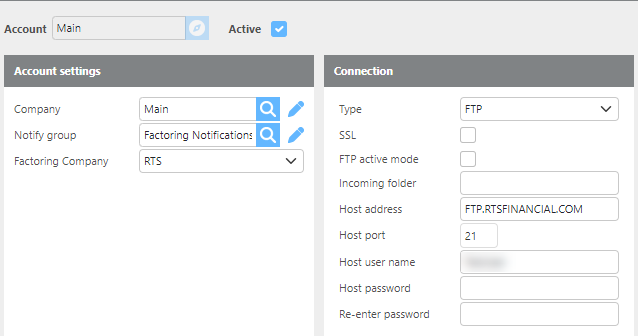
Account
|
Field |
Description |
|
Account ID |
Enter the account ID for this integration. |
|
Active |
Check this box if this account is active. |
|
Company |
Select which Ditat company this integration is for. |
|
Notify group |
Select the group that should receive notifications related to this integration. |
|
FTP URL |
Enter the FTP URL. Default: |
|
FTP port |
Enter the FTP port for this account. |
|
FTP incoming folder |
Enter the FTP incoming folder path. |
|
FTP user name |
Enter the FTP username for this account. |
|
Password |
Enter the FTP password for this account. |
|
Re-enter Password |
Re-enter the account-specific password to confirm. |
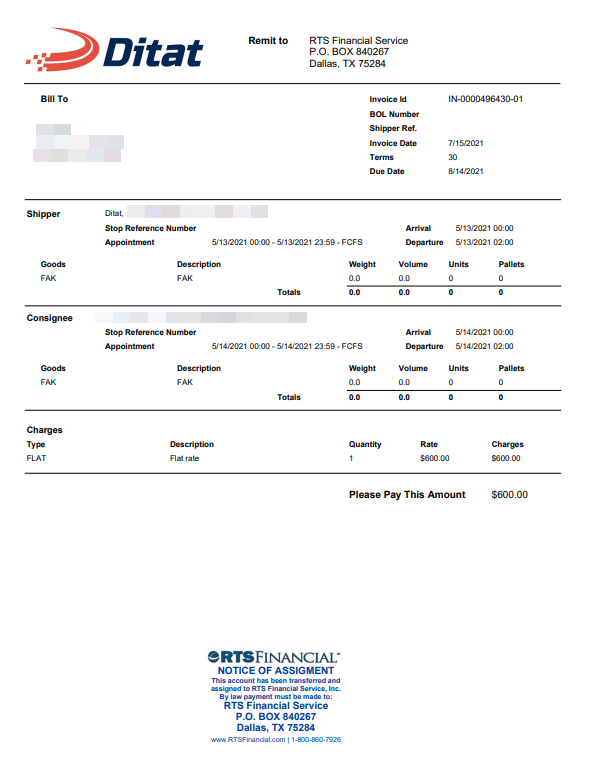
RTS Invoice Template
Ditat provides a separate invoice template — Invoice RTS Financial — that must be used when factoring with RTS. This template should be selected on the customer profile for all customers billed through RTS.
RTS Factoring CSV File
Below is an example of the CSV file format sent to RTS per invoice batch.