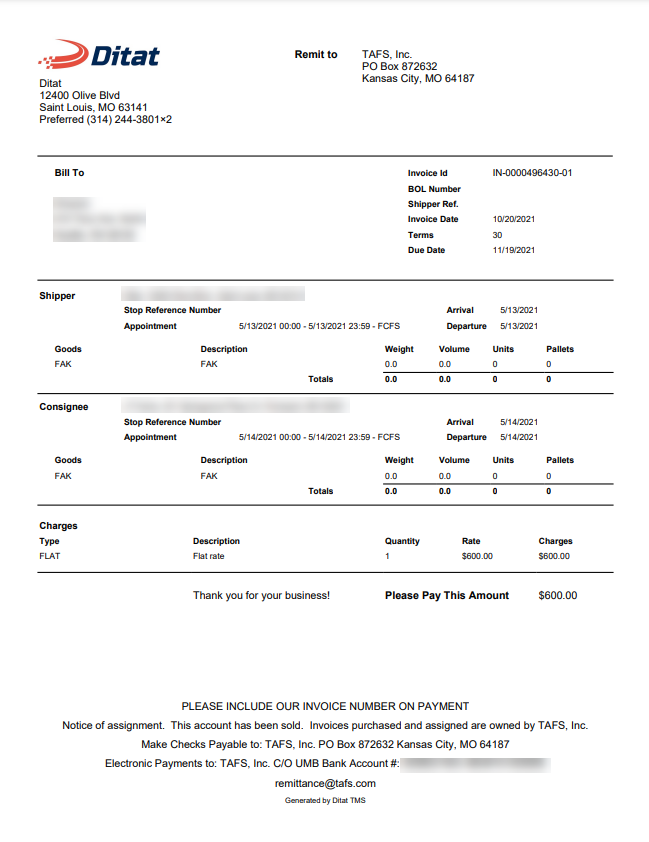
Ditat's TAFS integration automatically creates invoices in the TAFS portal with supporting documents attached.
Important Notes
Important: Customers billed through TAFS must use the TAFS-specific invoice template (Invoice TAFS).
Important: TAFS invoice batches cannot be reversed.
Note: Unlike other factoring integrations, secondary invoices will also be sent to TAFS.
Charges
For fuel to be sent to TAFS as a separate line item rather than merged with linehaul, it must be billed using a different payment type than the account's default fuel type.
Example: Bill as FSC instead of Fuel. When done this way, the charge will display in the "Other" section in the TAFS portal.
Account Settings
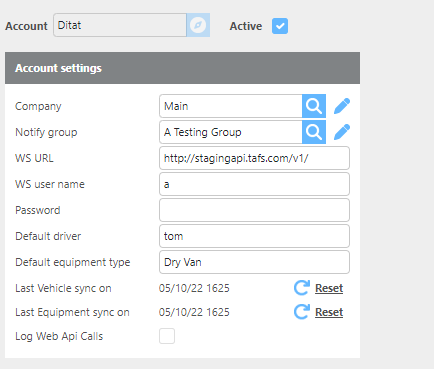
|
Field |
Description |
|
Active |
Check this box if this account is active. |
|
Account Id |
Enter the account ID for this integration. |
|
Company |
Select which Ditat company to link to this integration. |
|
Notify group |
Select the group that will be notified if an error occurs. |
|
WS URL |
Enter the web service URL for the TAFS integration. Default: |
|
WS user name |
Enter the web service username for this account. |
|
Password |
Enter the password for this account. |
|
Default driver |
Enter the driver that will be used on all invoices by default. |
|
Default equipment type |
Enter the default equipment type to use on invoices by default. |
TAFS Invoice Template
Ditat provides a separate invoice template — Invoice TAFS — that must be used when factoring with TAFS. This template should be selected on the customer profile for all customers billed through TAFS.